Basic System
Most of the game is played with the mouse, which you use to walk, pick targets and attack, while the keyboard opens your windows, starts the chat and uses your quick bar skills.
Checklist
- Click the ground or use W A S D to move.
- Click a monster to select it, and click it again to attack.
- Press Enter to chat, and start the line with @ for your party or # for your guild.
- Skills from the Book Seller have to be trained before you can use them.
- Meditate to recover HP, MP and AP faster.
Camera and movement
Click on the ground to walk there, or hold down the left mouse button and your character keeps walking toward the cursor. You can also walk with WASD, which move you relative to the camera, so W always takes you in the direction you're looking. Press R to switch between walking and running.
To turn the camera, hold the right mouse button and drag, and use the mouse wheel to zoom in and out. The arrow keys move the camera as well, with ← and → turning it and ↑ and ↓ tilting it, and Page Up and Page Down zoom. Holding the right Shift while you use these keys makes the camera move more slowly, which helps when you want to line up a view.
The game starts with a free camera, and Insert switches to a camera that stays behind your character as you move, and back again.
Keyboard shortcuts
Each of the main windows has its own key, and you can also open them from the Main Menu, the column of icons on your screen, where each icon shows its key. The table uses the titles the windows have in the game.
Key | Opens | Key | Opens |
|---|---|---|---|
I | Item, your inventory | P | Party |
C | Status, your character | G | Guild |
K | Skill | F | Friend List |
Q | Quest | N | Message, for notes from other players |
M | The map of the area you're in | O | Options |
H | Info., the help window | T | Titan Info./Inventory, while you ride a Titan |
Esc | Closes open windows, or opens the Game Menu | Z | Switches between Battle and Peace stance |
The minimap is always on screen and doesn't have a key of its own. There are a few other keys as well:
Enter starts typing in chat, and pressing it again sends the line.
F12 takes a screenshot, which is saved in the ScreenShot folder inside your game folder.
Holding the left Shift shows the names of the NPCs around you, and colors the players in your party green and the ones in your guild blue.
The Game Menu that Esc opens has HUD Layout, where you can move parts of the screen around, along with Settings, Character Select and Exit Game.
Chatting
Press Enter, type your message and press Enter again to send it. A normal line is seen by the players in the area around you, and to talk to a different group of people, you start the line with one of these symbols:
Start the line with | Who sees it |
|---|---|
Nothing | The players around you |
@ | Your party, wherever they are |
# | Your guild, wherever they are |
$ | Every guild in your alliance, although only guild masters and vice masters can send it |
% | Everyone on your map and channel |
/ and a name | Only that player, as a whisper, for example /Name hello |
You can also start a whisper by holding the left Alt and clicking a player. In the chat box, ↑ and ↓ bring back the lines you've already sent, and you can send one line per second.
A line that starts with ! runs an action instead of being sent, such as !Meditate, !Trade or !Duel, and these have to be typed with the same capital letters.
NPCs and other players
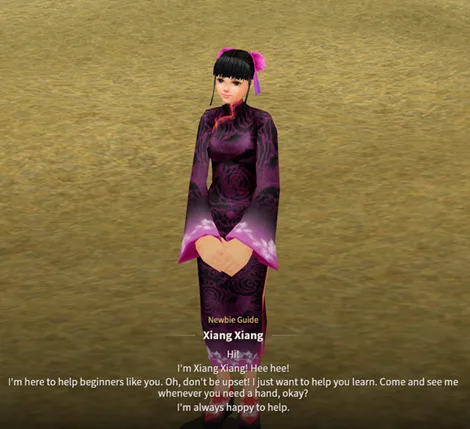
Click an NPC to select it, and click it again or double-click it to walk over and start talking. During a conversation, ↑ and ↓ move between the answers, Space or Enter picks one, and Esc ends the conversation.
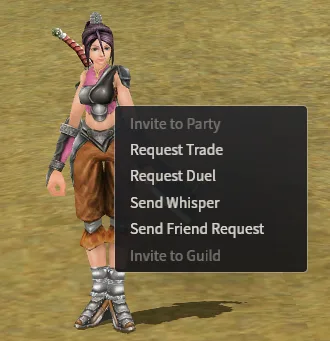
Right-clicking another player opens a menu where you can invite them to your party, request a trade or a duel, send a whisper or a friend request, or invite them to your guild. Anything you can't do at that moment is greyed out, for example Invite to Party when you're in a party but aren't its master.
Players can also set up a stall to sell their items, and double-clicking the player at the stall opens it so you can see what's for sale.
Combat
Click a monster to select it, then click it again to attack, or double-click it to attack straight away. Ctrl also attacks the monster you have selected. Once you've started, your character keeps attacking until the monster dies or you walk away by clicking the ground or using W A S D.
A normal attack is a combo of up to six strikes. Left to itself, your character repeats the first two strikes, and clicking the monster again while you're attacking carries on into the next strike of the combo. At level 1 the combo is two strikes long, at level 2 it grows to four, and from level 3 you have all six.
Tab cycles through the monsters within reach, starting with the nearest ones in front of you, and right-clicking without dragging clears your selection.
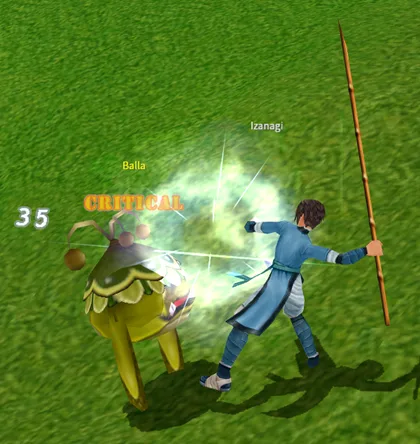
Your three bars are HP, AP and MP. HP is your health and MP is used up by your skills, while AP works as a shield that takes part of every hit before it reaches your HP, half of the damage from a normal attack and 70% of the damage from a skill. Once your AP has run out, the whole hit goes to your HP.
Z switches between Battle and Peace stance, although you'll rarely need it, since attacking or being hit puts you in Battle and you go back to Peace after standing still for 10 seconds. The stance only changes how your character stands and moves.
Dying costs nothing until you reach level 5. From level 5 each death takes some of the money you're carrying, and from level 6 some of your EXP as well, as explained in Death and reviving.
Drops and EXP
Anything a monster drops goes straight into your inventory, so there's nothing to pick up from the ground. Money always goes into your purse, but an item that doesn't fit into a full inventory is lost. The drop goes to whoever did the most damage to the monster, whether that's one player or a whole party, and in a party the loot setting decides which member gets each item.
How much EXP a monster gives depends on its level compared with yours:
The monster's level | EXP |
|---|---|
9 or more above yours | 150% |
1 to 8 above yours | 105% to 140%, 5% more for each level |
The same as yours | 100% |
1 below | 80% |
2 below | 60% |
3 below | 40% |
4 below | 20% |
5 below | About 10% |
6 or more below | None |
Monsters more than 6 levels below you don't drop anything for you either, and in a party this goes by the highest level reached by any member nearby.
Your EXP also depends on how much of the monster's HP you took off yourself. When you dealt all of the damage you get the full amount, and when other players helped, it goes down in steps of 20%, until you get nothing at all for a monster whose HP you took less than a fifth of. In a party, the damage of all the members counts together and the EXP is shared out between them.
Skills and the hotbar
From level 5 you can buy skill books from the Book Seller in each town for $ 1,620 each, and the Book Sellers have five books for each weapon. To learn a skill, double-click its book in your inventory, and the skill appears in your Skill window. Weapon skills only work while you're holding the matching weapon.
A new skill starts at Lv 0, and before you can use it, you have to train it with the Training Master:
Hold the matching weapon and talk to the Training Master in town.
Place the skill in the training slot of the window that opens and confirm.
In the Training Arena, defeat every monster before the time runs out, without being killed.
The time limit is between 2½ and 5 minutes, most often 4, and a gauge shows how much time is left and how many of the monsters you've defeated. A few special Ballas in the arena restore your HP, AP or MP when you defeat them. Winning raises the skill to Lv 1, while being killed or running out of time sends you back with full HP, AP and MP and costs you nothing apart from the fee.
Once it's trained, a skill gains skill EXP every time it hits something outside of town, and it needs training twice more, at Lv 6 and at Lv 11, where its EXP bar stops one point short until you've done it. Your very first training is free, and after that every training costs the same for any skill:
Training | Fee |
|---|---|
Lv 0 to Lv 1 | $ 500 |
Lv 6 to Lv 7 | $ 3,000 |
Lv 11 to Lv 12 | $ 5,000 |
Every town has its own Book Seller and Training Master:
Town | Book Seller | Training Master |
|---|---|---|
Lan Chow | Dai Zhen | Master Zhang Bao |
Beijing | Kee Xiao Lan for weapon books, and Liu Luo Guo for inner force and element books | Master ZhangLong |
Lo Yang | Yu Wen Hua Ji | Master Zhao Hu |
Kai Feng | Cai Jing | Master Wang Cao |
Chang An | Xiao He | Master Ma Han |
Open the Skill window with K and drag skills onto the quick bar, then press 1 to 0 to use a slot, or double-click it. Items such as potions can go on the quick bar too. The quick bar has four pages of ten slots, and F1 to F4 or the arrows beside the bar switch between them.

Resting
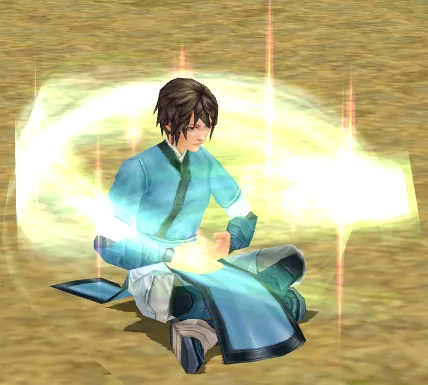
When you're low on HP, AP or MP, you can Meditate to get them back faster. Your character sits down, and every 5 seconds you recover 10 points plus 3% of your HP and MP and 8% of your AP, compared with 1% of your HP and MP and 5% of your AP while you're standing.
Every character knows Meditate from the start. You'll find it in the Skill window on the Special tab, under Living, and you can drag it to the quick bar or type !Meditate in chat, with a capital M. Using it again makes you stand up.
You can't move while you're meditating, and every hit you take does 50% more damage without making you stand up.
Key layouts
Everything above uses Shortcuts Priority Mode, which is the default. The other layout, Chat Priority Mode, lets you type into chat without pressing Enter first, and you can switch to it in Options (O) on the Game page, under Keys, by choosing it and clicking Confirm.
In Chat Priority Mode the letters you press go into the chat box, so the window keys, R and Z need the left Alt, for example Alt + I for your inventory. WASD type into chat as well, so you move by clicking. The quick bar moves to F1 to F10, and its pages to Alt + 1 to 4.